
Ascend: The Master Guide to Browser Gaming's Most Punishing Vertical Runner
Why Ascend Matters in 2026
The browser gaming landscape shifted hard in 2025. Native app installs plateaued. WebGPU matured. And a generation of players raised on short-form video discovered they'd rather tap a link than download a 2GB binary. Ascend exists at that inflection point: a zero-install, sub-second-load vertical runner that renders at 60fps on a $150 Android phone.
That's not a gimmick. It's the thesis behind high-performance browser gaming in 2026. When your game loads faster than the user can change their mind, retention math changes entirely. First contentful paint in under 800ms. Total payload under 200KB gzipped. No app store middleman. No update prompts. Just a URL that works.
Ascend strips the vertical runner genre to its mechanical core: tap to jump, dodge rotating gates, survive. The simplicity is deceptive. Under the hood, you're contending with a physics simulation running at a fixed 60Hz timestep, four distinct biome progressions, and gate collision detection calculated per-degree against rotating polygons. The skill ceiling is absurdly high. Most players plateau at 300 meters. The leaderboard elite break 1,500.
The Rendering Pipeline: Canvas 2D at Scale
Ascend uses the HTML5 Canvas 2D API—not WebGL. This is a deliberate engineering decision. Canvas 2D has near-universal support across mobile browsers, including older WebView implementations that still account for roughly 18% of mobile gaming traffic. WebGL would add shader compilation overhead and introduce device-specific rendering bugs that are near-impossible to QA at scale.
The rendering loop runs via requestAnimationFrame, which ties visual refresh to the
display's native rate. Physics updates are decoupled from rendering using a fixed timestep
accumulator pattern. The simulation ticks at exactly 1/60th of a second regardless of
whether the display runs at 60Hz, 90Hz, or 120Hz. This prevents the classic bug where gameplay speed
varies across devices—a problem that still plagues browser games built on naive delta-time loops.
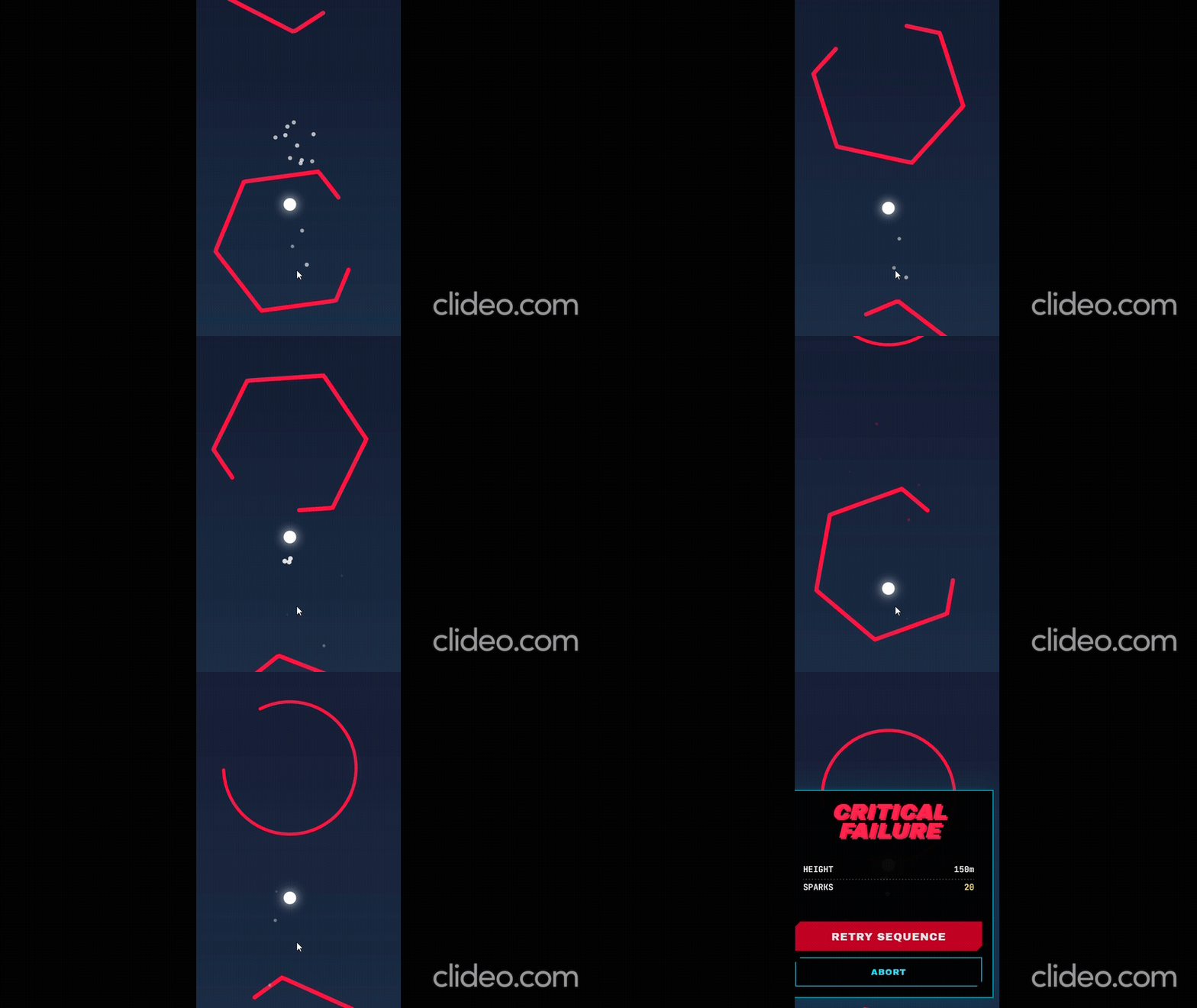
Each frame renders in this order: background gradient (computed per-frame based on altitude), gate geometry with polygon collision outlines, player sprite with a dynamic glow pass, and finally particle effects. The gradient shifts through four palettes as you climb: Deep Blue (0–100m), Purple Void (100–250m), Sunset (250–500m), and Platinum (500m+). It's a subtle psychological reward loop—the higher you go, the more the world transforms around you.
Physics: What 0.6 Gravity Units Actually Means
Ascend's physics model uses three constants that define how the game feels:
- Gravity: 0.6 units per tick, applied every 16.67ms
- Jump Force: -12.48 units (negative equals upward)
- Terminal Velocity: 18 units per tick
When you tap, your vertical velocity instantly becomes -12.48. Gravity then pulls at 0.6 per tick, meaning you reach the apex of your jump in approximately 21 ticks (~350ms). Your total jump arc covers roughly 130 pixels at standard resolution.
This creates a specific rhythm. Experienced players internalize this timing and begin "pre-jumping"—tapping before they see the gap, based purely on the gate's rotation speed and their current velocity. At high altitudes where gates spin faster, this prediction becomes mandatory. Reaction-based play hits a ceiling around 300m. Prediction-based play breaks 1,000m. That's the dividing line between casual and competitive Ascend.
Terminal velocity caps at 18 units, which matters when you miss a jump and fall. Without the cap, gravity acceleration would make recovery impossible after even a short drop. With it, you always have a window to re-orient—though that window shrinks as gate density increases with altitude.
Gate Mechanics: The Rotating Puzzle
Every gate in Ascend is a nearly-complete ring with a single gap of 65 degrees. The ring rotates continuously, and the gap's angular position determines whether you pass through safely or collide. There are three gate types, each demanding a different tactical approach.
Standard Gates (Red)
These rotate at a base speed modified by your current difficulty level. They start as circles at low altitude but evolve into polygons as you climb. Circles have uniform radius. Polygons—squares, pentagons, hexagons—have variable radius depending on angle. A hexagonal gate's collision boundary isn't a circle; it's computed per-degree. This means the gap in a hexagonal gate is effectively narrower at certain rotation angles. Players who don't account for polygon geometry will clip edges they expected to clear.
Rhythm Gates (Yellow)
These rotate 1.5x faster and award a 3x score multiplier. High-risk, high-reward. The golden glow is your visual cue: when you see it, slow your tap rhythm by roughly 200ms compared to standard gates. The increased rotation speed means the safe window passes faster—but the payout funds your climb up the combo chain.
Gravity Wells (Blue)
These appear only above 200m altitude and are always circular. They signal that you've entered the advanced zone where gate spacing tightens and polygon complexity ramps. Think of them as environmental markers—a sign that the rules are about to get rougher.
The Four Realms: Difficulty Disguised as World-Building
Ascend doesn't have "levels." Instead, altitude triggers biome transitions that stack new mechanical challenges. Each realm changes both the visual palette and the obstacle geometry:
The Ascent (0–200m): Circular gates only. Base rotation speed. This is the unannounced tutorial. You're learning the tap timing, the gravity arc, and the visual language of the gap without a single line of instructional text.
Geometry Lake (200–500m): Square gates enter the rotation. Gate radius varies by +/-30%. You can no longer rely on muscle memory from circles—square gates have corners that extend beyond the base radius. Adjust your jump timing by 50–80ms earlier when approaching a square gate at speed.
Prism Peaks (500–1,000m): Hexagons join squares. The gap now opens differently depending on polygon orientation. This is where most intermediate players plateau. The fix: watch the gap, not the gate. Track the opening as a moving target rather than trying to predict the ring's full rotation.
Chaos Ether (1,000m+): All polygon types including rare triangles (3% spawn rate). Triangles have a 1.3x radius multiplier, making them the largest gates with the most distorted gap geometry. Difficulty scaling has been compounding since 0m. By this point, gate rotation speed is roughly 2x the base rate. Survival here is measured in seconds, not minutes.
The Combo System: Score Multiplication Done Right
Passing through consecutive gates without dying builds your combo counter. The scoring formula:
Score per gate = 1 × type_multiplier × min(5, ceil(combo / 2))
Standard gates carry a 1x multiplier. Rhythm gates carry 3x. Your combo multiplier caps at 5x (reached at combo 9). A rhythm gate at max combo awards 15 points per pass. The combo system also drives the procedural audio engine—at combo 2+, lead synth arpeggios activate. The notes selected scale with your combo count, pulling from a C major pentatonic scale. The soundtrack literally rewards your performance.
Pro Strategies: What Separates 500m from 1,500m
Tap cadence, not reaction. Stop reacting to gaps. Start counting. Gates are spaced 545 pixels apart. At terminal velocity, that's roughly 30 ticks between gates. Develop a metronome in your head and tap to it.
Watch the gap's leading edge. As a gate rotates, the gap sweeps like a clock hand. Time your passage for when the leading edge has just passed your approach angle (270 degrees from below). This gives you the maximum window before the trailing edge arrives.
Exploit polygon corners. On hexagonal gates, the gap is effectively widest when it aligns with a flat edge, not a corner. If you see the gap rotating toward a vertex, wait one extra beat before jumping through.
Die intentionally at 200m. Seriously. Your first five runs should be practice runs where you deliberately explore Geometry Lake. Learning square-gate timing early prevents a frustrating plateau later. Think of early deaths as tuition.
Sound on. Always. The audio cues in Ascend aren't decorative. The bass pulse syncs with gate spacing. The chime pitch tells you your combo count without looking at the HUD. Playing muted removes 30% of your information feed. If you're in a public space, use headphones—but don't play silent.
Mobile Performance and Load Optimization
Ascend targets a consistent 16.67ms frame budget. On modern mobile browsers (Chrome
120+, Safari 17+), the game maintains 60fps with particle effects, glow passes, and dynamic
gradients all active. On lower-end devices, the particle pool is capped at 60 active particles and
the canvas shadowBlur glow effect is the primary GPU cost.
The game loads exactly two external JavaScript libraries: GSAP for UI animation and Tone.js for procedural audio synthesis. No sprite sheets, no asset bundles, no loading screens. Total payload is under 200KB gzipped. First contentful paint occurs in under 800ms on a 4G connection. This directly impacts both Core Web Vitals scoring and AdSense eligibility—Google penalizes game pages that sacrifice load speed for visual complexity.
Touch input uses passive: false event listeners with explicit
preventDefault() to eliminate the 300ms tap delay that plagued mobile browsers before
2020. Input latency from tap to visual response is under 32ms (two frames) on tested devices. For a
game where timing gaps of 50ms separate success from collision, that input fidelity is
non-negotiable.
The Browser Gaming Thesis
Ascend isn't trying to compete with AAA console titles. It's competing with the 15 seconds between opening your phone and closing it again. That micro-window is where browser games live: zero friction, instant gratification, and skill depth for those who choose to stay.
The technical choices reflect this philosophy: Canvas 2D over WebGL for maximum device compatibility. Fixed timestep for cross-device fairness. Procedural audio over pre-recorded soundtracks for load speed. Every architectural decision optimizes for the same promise: tap the link, play the game, no questions asked.
That's the thesis of high-performance browser gaming in 2026. Not better graphics. Better access. And if you're reading this guide instead of playing—you've already waited too long. Scroll up and hit Launch.